
Fortigate - NSE4

These are my notes to prepare these certification.
Introduction and initial configuration
SPUs
- Most FortiGate models have specialized acceleration hardware, called SPUs that can offload resource - intensive processing from main processing (CPU) resources. Most FortiGate devices include specialized content processors (CPs) that accelerate a wide range of important security processes, such as virus scanning, attack detection, encryption, and decryption. (Only selected entry-level FortiGate models do not include NPx and CPx processors).
- Processors involved:
- CPs: Content processors
- High-speed content inspection
- Not bound to interface, closer to applications
- Encryption and decryption (SSL)
- Antivirus
- SPs: Security processors
- Directly attached to network interfaces
- Increases system performance by accelerating IPS
- NPs: Network processors
- Packet processing
- NP7 provided NTurbo
- Directly attached to network interface
- SoC4: System-on-a-chip processor
- Optimized performance for entry level
- SoC4 platforms include NTurbo
- CPs: Content processors
- SPU and nTurbo data is now visible in a number of places on the GUI. For example, the Active Sessions column pop-up in the firewall policy list and the Sessions dashboard widget. Per-session accounting is a logging feature that allows FortiGate to report the correct bytes per packet numbers per session for sessions offloaded to an NP7, NP6 or NP6lite processor.
- NTurbo offloads firewall sessions that include flow-based security profiles to NP6 or NP7 network processors.
Without NTurbo, or with NTurbo disabled, all firewall sessions that include flow-based security profiles are
processed by the FortiGate CPU.
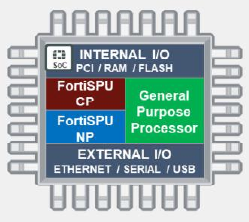
SPUs (Elements)
- The Fortinet content processor (CP9) works outside of the direct flow of traffic, providing high-speed
cryptography and content inspection services. This frees businesses to deploy advanced security whenever it
is needed without impacting network functionality. CP8 and CP9 provide a fast path for traffic inspected by
IPS, including sessions with flow-based inspection.
CP processors also accelerate intensive proxy-based tasks:
- Encryption and decryption (SSL)
- Antivirus
- FortiSPU network processors work at the interface level to accelerate traffic by offloading traffic from the main CPU. Models that support FortiOS 6.4 or later contain NP6, NP6lite, and NP7 network processors.
- Fortinet integrates content and network processors along with a RISC-based CPU into a single processor known as SoC4 for entry-level FortiGate security devices used for distributed enterprises. This simplifies device design and enables breakthrough performance without compromising on security.
- The Fortinet content processor (CP9) works outside of the direct flow of traffic, providing high-speed
cryptography and content inspection services. This frees businesses to deploy advanced security whenever it
is needed without impacting network functionality. CP8 and CP9 provide a fast path for traffic inspected by
IPS, including sessions with flow-based inspection.
CP processors also accelerate intensive proxy-based tasks:
Modes of operation
When you deploy FortiGate, you can choose between two operating modes: NAT mode or transparent mode.
- In NAT mode(default operation mode), FortiGate routes packets based on Layer 3, like a router. Each of its logical network interfaces has an IP address and FortiGate determines the outgoing or egress interface based on the destination IP address and entries in its routing tables.
- In transparent mode, FortiGate forwards packets at Layer 2, like a switch. Its interfaces have no IP
addresses and FortiGate identifies the outgoing or egress interface based on the destination MAC address.
The device in transparent mode has an IP address used for management traffic.
Interfaces can be exceptions to the router versus switch operation mode, on an individual basis.
When you enable virtual domains (VDOMs) on FortiGate, you can configure each VDOM for NAT mode or
transparent mode, regardless of the operation mode of other VDOMs on FortiGate. By default, VDOMs are
disabled on the FortiGate device, but there is still one VDOM active: the root VDOM. It is always there in the
background. When VDOMs are disabled, the NAT mode or transparent mode relates to the root VDOM.
VDOMs are a method of dividing a FortiGate device into two or more virtual devices that function as multiple
independent devices. VDOMs can provide separate firewall policies and, in NAT mode, completely separate
configurations for routing and VPN services for each connected network or organization. In transparent mode,
VDOM applies security scanning to traffic and is installed between the internal network and the external
network.
By default, a VDOM is in NAT mode when it is created. You can switch it to transparent mode, if required
Factory default settings
- IP: 192.168.1.99/24
- MGMT interface on high-end and mid-range models
- Port1 or internal interface on entry-level models
- PING, HTTPS and SSH protocol management enabled
- Built-in DHCP server is enabled on port1 or internal interface
- Only on entry-level models that support DHCP server
- Default login:
- User: admin
- Password: (blank)
All FortiGate models have a console port and/or USB management port. The port provides CLI access without a network. You can access the CLI using the CLI console widget on the GUI, or from a terminal emulator, such as PuTTY or Tera Term.
FortiGuard Subscription Services
Some FortiGate services connect to other servers, such as FortiGuard, in order to work. FortiGuard Subscription Services provide FortiGate with up-to-date threat intelligence. FortiGate uses FortiGuard by:
- Querying the FDN(FortiGuard Distribution Network) on an individual URL or host name
- Major data centers in North America, Asia and Europe
- Or, from FDN through your FortiManager
- FortiGate prefers the data center in nearest line zone, but will adjust by server load
- Major data centers in North America, Asia and Europe
- Live queries: FortiGuard web filtering, DNS filtering and antispam
Queries are real-time; that is, FortiGate asks the FDN every time it scans for spam or filtered websites. FortiGate queries, instead of downloading the database, because of the size and frequency of changes that occur to the database. Also, you can select queries to use UDP or HTTPs for transport; the protocols are not designed for fault tolerance, but for speed. So, queries require that your FortiGate device has a reliable internet connection.
- service.fortiguard.net for propietary protocol on UDP port 53 or 8888
- securewf.fortiguard.net for HTTPS over port 53, 443 or 8888
- Package updates: FortiGuard antivirus and IPS
Packages, like antivirus and IPS, are smaller and don’t change as frequently, so they are downloaded (in many cases) only once a day. They are downloaded using TCP for reliable transport. After the database is downloaded, their associated FortiGate features continue to function, even if FortiGate does not have reliable internet connectivity. However, you should still try to avoid interruptions during downloads—if your FortiGate device must try repeatedly to download updates, it can’t detect new threats during that time.
- update.fortiguard.net
- TCP port 443 (SSL)
| Some servers | Domain name |
|---|---|
| Object download | globalupdate.fortinet.net |
| Querying service (webfiltering,antispam) | globalguardservice.fortinet.net |
| Fortigate Cloud logging | globallogctrl.fortinet.net |
| Fortigate Cloud management | globalmgrctrl.fortinet.net |
| Fortigate Cloud messaging | globalmsgctrl.fortinet.net |
| Fortigate Cloud sandbox | globalaptctrl.fortinet.net |
| The productapi used by OCVPN registration and GUI icon download | globalaptctrl.fortinet.net |
By default, the FortiGuard access mode is anycast on FortiGate, to optimize the routing performance to the FortiGuard servers. The FortiGuard access mode anycast setting forces the rating process to use protocol HTTPS, and port 443.
The domain name of each FortiGuard service is the common name in the certificate of that service. The certificate is signed by a third-party intermediate CA. The FortiGuard server uses the Online Certificate Status Protocol (OCSP) stapling technique, so that FortiGate can always validate the FortiGuard server certificate efficiently. FortiGate will complete the TLS handshake only with a FortiGuard server that provides a good OCSP status for its certificate. Any other status results in a failed SSL connection. The FortiGuard servers query the OCSP responder of the CA every four hours and update its OCSP status. If FortiGuard is unable to reach the OCSP responder, it keeps the last known OCSP status for seven days.
FortiGate aborts the connection to the FortiGuard server if:
- The CN in the server certificate does not match the domain name resolved from the DNS.
- The OCSP status is not good.
- The issuer-CA is revoked by the root-CA.